
ComNet equipment is built for environments where ordinary office networking gear struggles: traffic cabinets, security installations, utility substations, transit systems and industrial plants. Its industrial Ethernet switches, Power over Ethernet devices and fibre media converters often sit inside enclosures exposed to heat, cold, vibration and electrical noise, quietly moving video and data for years at a time.
Because these devices are installed in demanding places and frequently left untouched once they work, the documentation matters enormously. This guide explains how system integrators, facility managers and technicians can use ComNet manuals effectively, from planning an installation and configuring a managed switch to diagnosing link problems and keeping records that make future maintenance straightforward.
Why Industrial Network Manuals Deserve Attention
Industrial networking hardware differs from consumer equipment in ways that are easy to overlook. Power input ranges, DIN rail or rack mounting options, operating temperature ratings, grounding recommendations and fibre type compatibility all vary between models. Getting any of these wrong can lead to intermittent faults that are difficult to trace once the equipment is buried in a cabinet.
The installation manual for each ComNet product sets out these requirements for that specific model. Reading it before installation helps you choose the correct power supply, plan cable routes, confirm whether a unit supports single-mode or multimode fibre, and understand how indicator LEDs behave. Treating the manual as part of the design process, rather than an afterthought, prevents many avoidable site visits.
Manuals are equally useful once a system is running. Maintenance teams who inherit a site rarely have the original design notes, and the product documentation becomes their main reference for how each unit should behave. Knowing the expected LED patterns, the supported power range and the default management settings allows a technician to distinguish quickly between normal operation and a genuine fault. That knowledge shortens outages, reduces unnecessary hardware swaps and helps teams plan upgrades with confidence, because they understand the capabilities and limits of the equipment already installed in the field.
See also: How Handbag Straps Extend the Life and Versatility of Your Bags
Finding the Right Document for Your Model
ComNet offers a wide range of products with similar-looking part numbers, and small differences in a model code can indicate a different number of ports, a different fibre connector or a different power option. Always match the documentation to the full part number printed on the device label rather than relying on a product family name alone.
Projects often outlive the original paperwork. A switch installed years ago may need reconfiguring after the original contractor has moved on and the printed manual has disappeared. Searchable archives on manualmachine.com make it easier to locate the installation guide or user manual for a specific unit, so technicians can confirm settings and wiring before they start work instead of guessing in the field.
Installing Switches and Media Converters Correctly
A typical ComNet installation manual covers mounting, power connection, grounding, port descriptions and LED indicators. Follow the mounting guidance carefully, because industrial units rely on correct orientation and spacing for heat dissipation inside sealed enclosures. The manual will also explain how to wire redundant power inputs where the model supports them, which is valuable in critical systems.
For media converters, the documentation explains which fibre types and connectors the unit expects and whether it must be paired with a matching unit at the far end. Mismatched wavelengths, wrong fibre mode or incorrectly crossed transmit and receive strands are common reasons a link fails to come up. Checking the manual’s pairing and connection guidance before blaming the hardware saves considerable time.
Working Safely with Power over Ethernet
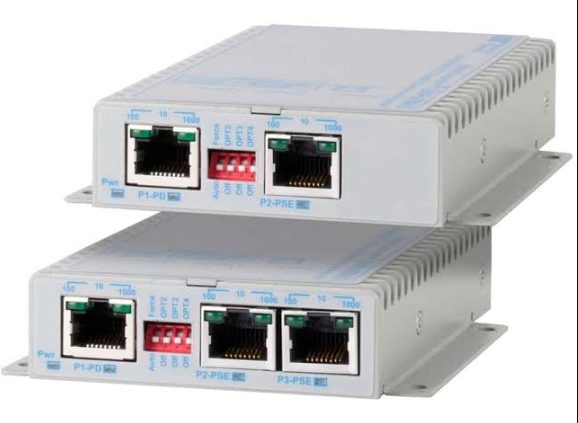
PoE switches and injectors supply power to cameras, wireless access points and other devices over the same cable that carries data. The manual explains which ports provide power, which PoE standards the device supports, and how the overall power budget is shared across ports. Exceeding that budget can cause devices to drop off the network or reboot unexpectedly.
Before connecting a group of cameras, add up their expected power draw and compare it with the budget described in the switch documentation, leaving sensible headroom. Pay attention to the recommended power supply, since an undersized supply limits what the switch can deliver. The manual also notes cable considerations, as long runs and poor-quality cabling can affect both data performance and power delivery.
Configuring Managed Switches
Managed ComNet switches offer features such as VLANs, quality of service, multicast handling, ring redundancy and access control. The user or configuration manual explains how to reach the management interface, how to set an IP address, and how each feature is configured. It also covers firmware updates and how to save or restore a configuration file.
Security deserves particular care. Change default credentials during commissioning, disable services you do not need, and document the settings you apply. If a switch carries surveillance video, multicast features such as IGMP snooping may need to be configured as described in the manual to prevent unnecessary traffic flooding. Keep an exported configuration backup alongside the manual so a replacement unit can be restored quickly.
Troubleshooting with the Documentation
When a link goes down, start with the LED descriptions in the manual. Indicators for power, link and activity tell you whether the unit is powered, whether a physical connection exists and whether traffic is passing. Combined with the port and fibre descriptions, these lights often reveal whether the problem is power, cabling, optics or configuration.
Work methodically: confirm power at the input terminals, check that fibre connectors are clean and correctly seated, verify the speed and duplex settings on copper ports, and review any configuration changes made recently. For PoE issues, check the power budget and the port settings. If the manual’s guidance does not resolve the problem, record your observations before contacting technical support.
Keeping Project Records Organised
Industrial networks change over time as cameras are added, cabinets are relocated and systems are upgraded. A simple documentation pack for each site should include the manuals for every installed model, a network diagram, IP address assignments, configuration backups, fibre test results and notes on any non-standard settings. Store copies both on site and in a central location.
When you need documentation for additional hardware or an older unit, browse the ComNet user manuals section to find guides that match your exact part numbers. Well-kept records reduce downtime, help new technicians understand an existing installation and make expansion projects far smoother. In environments where networks support safety and security, that preparation is not merely convenient; it is part of running a reliable system.